

Building Validation Scripts with AI to Automate Manual Checks

What you’ll learn
- Why repeated manual checks eventually leave gaps
- How to define the validation specification first and build the script with AI
- How automated configuration checks turn recurring mistakes into preventable failures
Automate Manual Checks with Validation Scripts
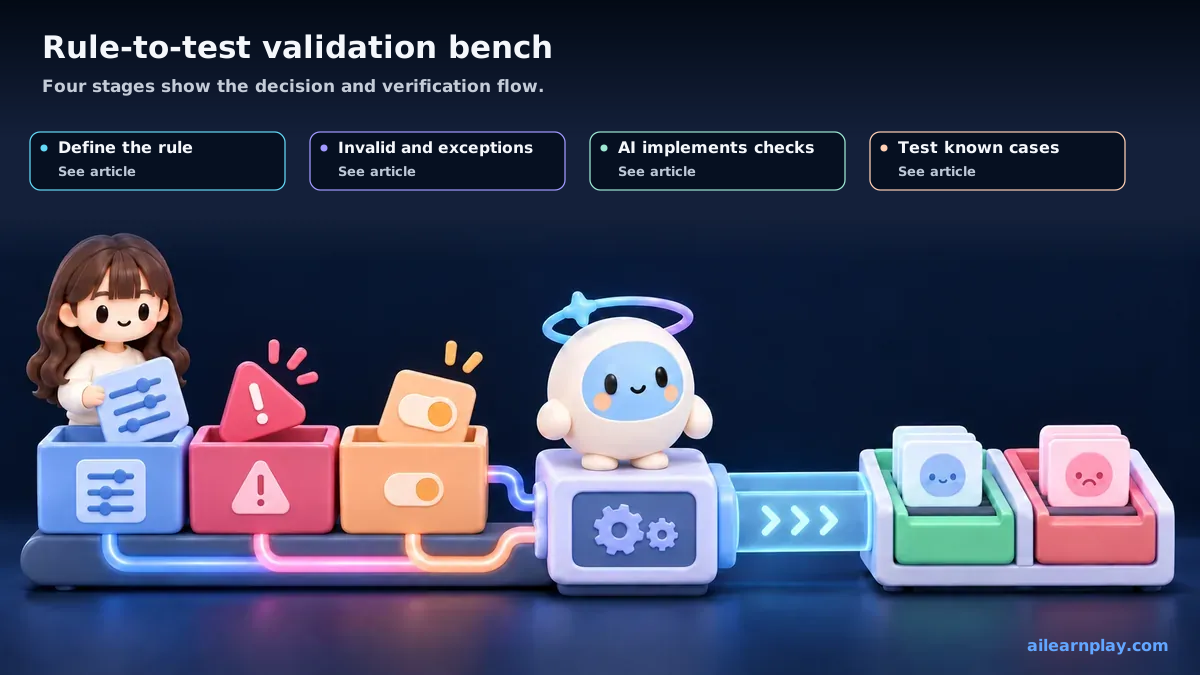
Automating a repeated check starts by specifying the target, violation examples, allowed exceptions, and pass/fail conditions before writing code. This repository moved from manual configuration comparison to scripts that detect inconsistencies immediately after a change. AI can assist with implementation, but the project owner defines what counts as a violation.
By the end of this article, you will have practical criteria for answering “How can AI assist with a validation script while keeping false positives manageable?” in your own context.
Build a Validation Script from Rules, Violations, and Exceptions
As I built this site, the number of harness (the set of rules, procedures, and validation that guides AI work in a project) files (the configuration files that instruct AI) kept growing. Once the count of files with cross-references — CLAUDE.md, rule files, skill files, agent definition files — exceeded ten, manual consistency checks became impractical.
For example, confirming “does CLAUDE.md reference a rule file under shared/rules/ that actually exists?” or “is the script path listed in the command definition still valid?” by reading each file by eye takes time and leads to oversights.
To address this, I decided to build a validation script.
I cover the underlying configuration drift and prevention policy in What Harness Drift Is. This article is limited to turning detection requirements into an executable validation script.
A Validation Script Detects Rule Violations Automatically
A validation script is a program that automatically checks whether configuration is correct.
A familiar analogy: instead of a person visually verifying one by one that every item on a packing list is in the box before a shipment goes out, a machine does the check. That is the idea here.
The script for this site (npm run harness:check) confirms things such as:
- Whether paths referenced in harness files actually exist
- Whether symbolic link targets are valid
- Whether required fields are present in rule files
- Whether commands listed in CLAUDE.md are actually defined
Give AI Detection Examples and Exceptions Before Implementing Validation
When building the script, I did not start by telling AI to “write the code.” I started by defining the specification — what should be checked.
Step 1: Identifying what to check
First, I listed in my own words what “broken” would look like: “a referenced file does not exist,” “a slug (the short identifier used in a public URL or internal article link) does not match the format specification,” “a symbolic link is broken.” I wrote these as a bulleted list.
Step 2: AI supports the implementation
I handed this list to AI and asked it to write a Node.js script that checks each item. AI translated each check into code.
Step 3: Testing and requesting revisions
I ran the script and reviewed the output. I gave specific feedback — “this error is not actually a problem,” “this item is not being detected” — and iterated on fixes.
Overall, my role was to define the specification and verify the behavior. AI handled nearly all of the code writing.
Automated Detection Stops Omissions Immediately After a Change
Once the script was ready, I incorporated running npm run harness:check into the procedure after every configuration update.
As a result, problems such as “AI rewrote a rule file to reference a different path” or “AI accidentally removed a symbolic link” were detected at the next command execution.
The kind of problem that previously went unnoticed for a while was now caught immediately after the change occurred.
Define Detection Conditions and Exceptions Before Implementation
In retrospect, the quality of the script depended on how well I specified what to check. Asking AI to “build a validation script” with a vague spec leads to missing important checks or including irrelevant ones.
AI is good at writing code, but deciding “what to check and to what extent” requires understanding the project context — and that is something the human must supply. This division of responsibility determines how useful the script ends up being.
Summary: Let People Define the Validation, Use AI to Implement It, and Test Known Examples
Manually verifying harness configuration consistency has limits. Building a validation script makes it possible to detect configuration inconsistencies automatically. AI handles the implementation, but the human must define the specification — deciding what to check. That division of responsibility is what makes the script practical.
Start with one repeated check and write at least one violating example and one valid example. Items that depend on context or meaning cannot be settled by simple text matching, so treat automated matches as candidates for human review.